Welcome to rupi
rupi is a small terminal coding harness. It connects a model to a workspace, lets the model inspect files and (when you allow it) change them, and records what happened so you can inspect or resume the session later.
You do not need to know Claude Code, Codex, Pi, Rust, or agent terminology to try it. Think of rupi as three things:
- a terminal program you start;
- a model endpoint that supplies the responses;
- a guarded set of tools for reading, editing, and testing files.
rupi is an independent project, not a rewrite or Rust port of Pi. It does reuse selected Pi-compatible skills, prompts, packages, extensions, and session formats when that is useful.
The shortest path to a first answer
- Install rupi.
- Start a local Qwen3.8-Flash-Next server.
- Create a safe configuration.
- Ask a read-only question.
- Resume, inspect, or replay the session.
- Try the Test Ledger live example, then the Read Queue and Event Outbox live examples.
The default configuration does not approve file writes, edits, or shell commands. Start with a read-only prompt, then decide deliberately whether a trusted workspace should allow mutations.
Useful mental model
You ──> rupi ──> local or remote model
          │
          ├── read-only tools by default
          ├── explicit mutation policy
          └── durable session + trace in .rupi-state/
The model's current prompt is temporary working context. The trace is the durable record. Compaction can shorten the next prompt without erasing the recorded history.
Where to go next
- Installation
- Quickstart
- Test Ledger live example
- Read Queue live example
- Event Outbox live example
- Interactive terminal
- CLI reference
- Models and providers
- Tools and safety
- Trace and replay
- Pi compatibility
For runtime contracts and design decisions, see Architecture and the repository's canonical design.
Install rupi
This guide assumes you can open a terminal and edit a JSON file. You do not need Node.js, Python, or a previous coding-agent harness for the normal local-model workflow.
Option A: use the release installer
The installers download the archive for your platform, verify its published SHA-256 checksum, and install only for your user. No administrator access or Rust toolchain is needed.
Linux and macOS
The POSIX installer supports Linux x86_64 and macOS Intel/Apple Silicon. It defaults to
~/.local/bin and does not edit shell startup files:
curl --proto '=https' --tlsv1.2 -fsSL https://raw.githubusercontent.com/SaehwanPark/rupi/main/install.sh | sh
export PATH="$HOME/.local/bin:$PATH"
rupi --help
To inspect the script first, download it instead of piping it to sh:
curl --proto '=https' --tlsv1.2 -fsSL https://raw.githubusercontent.com/SaehwanPark/rupi/main/install.sh \
  -o install-rupi.sh
less install-rupi.sh
sh install-rupi.sh --version v0.2.2 --install-dir "$HOME/.local/bin"
rm install-rupi.sh
Use --version v0.2.2 to pin this release. --install-dir DIRECTORY and the equivalent
RUPI_INSTALL_DIR environment variable are useful for a managed or repository-local
installation. The script uses curl or wget, plus sha256sum, shasum, or openssl.
Windows PowerShell
The PowerShell installer supports Windows x86_64 and defaults to
$env:LOCALAPPDATA\rupi\bin:
Invoke-WebRequest https://raw.githubusercontent.com/SaehwanPark/rupi/main/install.ps1 -OutFile .\install-rupi.ps1
Get-Content .\install-rupi.ps1
.\install-rupi.ps1 -Version v0.2.2 -AddToPath
Remove-Item .\install-rupi.ps1
rupi --help
-AddToPath updates the user-level PATH; it does not require administrator access. Omit
it to choose your own PATH entry with -InstallDir. For a quick latest-release install,
review the script and run it with irm https://raw.githubusercontent.com/SaehwanPark/rupi/main/install.ps1 | iex.
The GitHub Releases page contains the archives and checksum sidecars if you prefer to download them manually. The release workflow currently publishes:
| Platform | Target archive |
|---|---|
| Linux x86_64 | rupi-v0.2.2-x86_64-unknown-linux-gnu.tar.gz |
| macOS Intel | rupi-v0.2.2-x86_64-apple-darwin.tar.gz |
| macOS Apple Silicon | rupi-v0.2.2-aarch64-apple-darwin.tar.gz |
| Windows x86_64 | rupi-v0.2.2-x86_64-pc-windows-msvc.zip |
Option B: install from source
Install Rust 1.85 or newer from rustup, then run:
git clone https://github.com/SaehwanPark/rupi.git
cd rupi
cargo install --path . --locked
rupi --help
cargo install --path . puts the rupi executable in Cargo's binary directory. If your
shell cannot find it, add ~/.cargo/bin to PATH (on Windows, %USERPROFILE%\\.cargo\\bin).
To build without installing:
cargo build --release
# target/release/rupi     (Linux/macOS)
# target\\release\\rupi.exe (Windows)
Optional pieces
- llama.cpp is needed only when you want the local Qwen example in the next guide.
- Node.js 22.6+ is needed only for an explicitly activated Pi TypeScript extension.
- MCP servers are optional and are activated one at a time.
If installation fails
curl: command not foundorwget: command not found: install one of those small download tools with your operating system package manager.cargo: command not found: install Rust with rustup and restart the terminal.rupi: command not found: open a new shell after changingPATH, or runcargo run -- run ...from the checkout.- No matching prebuilt target: use the source build or download a matching archive from the releases page.
- Windows blocks the downloaded executable: use the file's Properties dialog to unblock it, or build from source.
First session: local Qwen3.8-Flash-Next
This walkthrough uses the llama.cpp server already supported by rupi's OpenAI-compatible provider. It is written for someone who has never used a coding harness.
1. Start llama.cpp
Keep this terminal open while rupi is running. In PowerShell, adapt the model path if your GGUF files live somewhere else:
llama serve `
  -m "C:\path\to\Qwen3.8-Flash-Next-UD-IQ4_XS-00001-of-00003.gguf" `
  --alias qwen3.8-flash-next `
  --host 127.0.0.1 `
  --port 8000 `
  --jinja `
  -ngl 999 `
  -c 262144 `
  -n 32768 `
  --cache-type-k q8_0 `
  --cache-type-v q8_0 `
  -b 2048 `
  -ub 512 `
  --flash-attn on `
  --reasoning on `
  --reasoning-effort xhigh `
  --reasoning-preserve `
  --temp 1.0 `
  --top-p 0.95 `
  --top-k 20 `
  --min-p 0.0 `
  --presence-penalty 0.0 `
  --repeat-penalty 1.0
The exact model file can be split across several GGUF files; pass the first file as shown by your llama.cpp build. Confirm that the server is ready from a second terminal:
(Invoke-RestMethod http://127.0.0.1:8000/v1/models).data
You should see the model id qwen3.8-flash-next. If you do not, copy the id that your
server reports into both primary and model below.
2. Create config.json
Create this file in the project you want rupi to inspect. It uses no cloud key and starts with mutations refused:
{
  "version": 1,
  "primary": "local/qwen3.8-flash-next",
  "thinking": "xhigh",
  "state_dir": ".rupi-state",
  "endpoints": [
    {
      "provider": "local",
      "model": "qwen3.8-flash-next",
      "base_url": "http://127.0.0.1:8000/v1",
      "capabilities": {
        "text": true,
        "images": false,
        "tools": true,
        "exposed_reasoning": "native",
        "context_window": 262144,
        "max_output_tokens": 32768
      },
      "request_timeout_ms": 900000
    }
  ],
  "tools": {
    "auto_approve_mutating": false,
    "shell_timeout_ms": 120000,
    "max_output_bytes": 8192
  }
}
primary is the model rupi uses. base_url stops at /v1; rupi adds
/chat/completions. exposed_reasoning: "native" is a claim about what the endpoint
exposes, not a promise that every response contains reasoning text. The optional
request_timeout_ms is a total wall-clock budget for one provider request; it is
different from the provider's idle-read timeout. For a bounded coding slice, lower
the output cap and use a shorter deadline such as 120000. A timeout is an incomplete
turn: inspect the trace and resume with a smaller prompt rather than treating it as
project verification.
3. Run a read-only request
From the project directory:
rupi run --config config.json --cwd . \
  --prompt "List the top-level files and explain the project in three bullets. Do not change files."
PowerShell uses the same command on one line:
rupi run --config config.json --cwd . --prompt "List the top-level files and explain the project in three bullets. Do not change files."
Two streams are intentional:
- stdout is the assistant's answer, so it can be piped into another command;
- stderr is the transcript: reasoning provenance, tool calls, warnings, and state changes.
A session directory appears under .rupi-state/. Do not commit that directory to your
project unless you deliberately want to share its redacted history.
4. Decide whether to allow changes
The default is safe: write, edit, and exec are refused. When you are in a workspace
you trust and want the model to edit it, change only this setting:
"tools": {
  "auto_approve_mutating": true,
  "shell_timeout_ms": 120000,
  "max_output_bytes": 8192
}
Make a backup or use version control before enabling it. --cwd remains the confinement
root; rupi still refuses paths that escape it. Turn the setting off again when you return
to an unfamiliar repository.
5. Find and reuse a session
The run prints or records a session id. List the latest trace:
rupi trace --config config.json
Resume by id or a unique prefix:
rupi run --config config.json --cwd . --resume <session-id-or-prefix> \
  --prompt "Continue from the previous result; first summarize what is still unresolved."
Replay is read-only. It does not start llama.cpp, call a provider, or execute recorded mutations:
rupi replay .rupi-state/sessions/<session-id>.trace.jsonl
For a live multi-turn editor, use:
rupi interactive --config config.json --cwd .
Common fixes
| Symptom | What to check |
|---|---|
connection refused | llama.cpp is still running and listening on 127.0.0.1:8000. |
model not found | /v1/models reports the exact id used in both config fields. |
invalid workspace | --cwd exists and is the repository you intend to give the model. |
| No reasoning text | The server may expose only answer text; keep the provenance declaration honest. |
| A write is refused | Set auto_approve_mutating only in a trusted workspace. |
| Resume is refused | Use a complete session id or a prefix that matches exactly one session. |
| A Windows command fails | Use process with a direct argv list for known programs; use dir, not Unix ls, in exec. |
| A multi-file turn exhausts its budget | Split implementation and verification into separate bounded turns; exhaustion means incomplete work. |
If you use another OpenAI-compatible server, keep the same config shape and replace the model id, URL, context window, and reasoning declaration with values that server documents.
Live example: Test Ledger
The repository includes a small real project called Test Ledger. It is a dependency-free Python 3 command-line task ledger with durable JSON state and a test suite. It is small enough to understand in one sitting, but it exercises the workflow that matters: inspect a specification, make a bounded change, run tests, and inspect what rupi recorded.
The source lives at
docs/cases/2026-09-20-task-ledger/toy-project.
The package is named tasklog, so the Python commands below use python -m tasklog.
1. Prepare a disposable copy
Clone rupi if you have not already:
git clone https://github.com/SaehwanPark/rupi.git
cd rupi/docs/cases/2026-09-20-task-ledger/toy-project
The example requires Python 3 and no third-party packages. If you plan to let the
model edit files, work in a copy or a version-controlled branch. The checked-in
example config enables mutations because it was used for the original case study;
set tools.auto_approve_mutating to false before your first read-only request.
2. Verify the project without a model
Run the project’s own tests and a small command sequence first:
python -m unittest discover -s tests -p "test_*.py" -v
python -m tasklog add "write the release notes"
python -m tasklog add "run the tests"
python -m tasklog list
python -m tasklog done 1
python -m tasklog list --all
The independent acceptance oracle starts a fresh Python process for every command:
cd ..
python -m unittest discover -s acceptance -p "test_tasklog_subprocess.py" -v
cd toy-project
On Windows PowerShell, the same Python commands work. Use Set-Location or cd
to change directories; do not paste Bash line-continuation backslashes into a
PowerShell command.
3. Ask rupi for a read-only review
Start the local model described in the quickstart, then ask for one narrow, read-only inspection:
rupi run --config rupi.config.json --cwd . \
  --prompt "Read SPEC.md and the project files. Do not change anything. Summarize the contract, the state-file safety rules, and the tests that prove them."
The assistant answer is on stdout; the execution transcript and diagnostics are
on stderr. This separation lets you save the answer without losing the evidence
about what the agent did.
For a controlled edit, make a backup or commit first, set
auto_approve_mutating to true only in this disposable workspace, and ask for one
small change followed by the test command. Keep the request bounded; a first task
does not need to redesign the whole project.
4. Inspect and replay the evidence
The run creates .rupi-state/ in the example directory. Find the session id in
the run output, then inspect it without starting the provider or executing old
commands:
rupi trace --config rupi.config.json --quiet --no-reasoning
rupi replay .rupi-state/sessions/<session-id>.trace.jsonl --tools --sequence
Replay is read-only. If a turn is interrupted, use the session id with
--resume after inspecting the trace and make the next prompt a small completion
slice. A partial workspace is not the same thing as a verified project; run the
Python suite independently before calling the work complete.
What this example demonstrates
- a clear specification and a bounded workspace;
- safe read-only inspection before enabling mutations;
- durable state that survives separate Python processes;
- independent verification rather than trusting the model’s final prose;
- trace and replay as recovery and audit tools.
The example is deliberately not a framework tutorial. It is a concrete first project for learning the rupi workflow.
Live example: Read Queue
Read Queue is the second runnable case in this repository. It is a dependency-free Python 3 HTTP/JSON service backed by SQLite. Compared with Test Ledger, it adds a long-lived process, HTTP boundaries, relational persistence, and recovery after a server restart.
The specification, implementation, and independent acceptance oracle are checked into the repository.
1. Verify the project independently
From a clone of rupi, enter the project directory and run its own tests before asking a model to inspect it:
cd docs/cases/2026-09-20-reading-queue/project
python -W error::ResourceWarning -m unittest discover -s tests -p "test_*.py" -v
python -m readqueue --help
python -m readqueue serve --help
The independent oracle must be run from the case root, not from inside the model workspace:
cd ..
python -W error::ResourceWarning -m unittest discover -s acceptance -p "test_*.py" -v
cd project
It starts the service in a fresh process, exercises CRUD, filtering and error responses, then restarts the service against the same SQLite database.
2. Ask rupi for a bounded verification
The checked-in configs target the local Qwen endpoint and enable mutations for
the original case study. For a read-only review, copy one config and set
tools.auto_approve_mutating to false first. Keep implementation and
verification in separate turns; a request-budget exhaustion or provider request
deadline is an incomplete turn, not evidence that the project passed. For an
implementation slice, use a copied config with a bounded request_timeout_ms
(for example 120000) and a modest output cap; inspect and resume after a timeout
instead of letting one local-model request consume the whole session.
rupi run --config rupi.recovery.config.json --cwd . \
  --prompt "Read SPEC.md and inspect the implementation briefly. Work in a small bounded slice. Run the project suite before broad polish, then report exact command results. Do not run the independent acceptance oracle; I will run it separately."
On Windows PowerShell, use the direct argv process tool for known programs
(python.exe with an argument array) and use dir rather than Unix ls when
shell listing is needed. This avoids shell quoting differences and keeps the
program arguments unambiguous.
3. Inspect the evidence
After the run, inspect the session without contacting the model or executing old tools:
rupi trace --config rupi.recovery.config.json --quiet --no-reasoning
rupi replay .rupi-state/sessions/<session-id>.trace.jsonl --tools --sequence
Only call the project complete after both its own suite and the independent fresh-process oracle pass. The case demonstrates a useful rupi workflow:
- a multi-file service can be built from a written contract;
- direct process execution makes platform-specific verification explicit;
- restart behavior is checked outside the model's claims;
- trace and replay preserve what happened when a bounded turn is interrupted.
Live example: Event Outbox
Event Outbox is the third runnable case in this repository. It keeps the HTTP, SQLite, and restart boundaries from Read Queue, then adds idempotent event admission, retryable delivery state, and a separate sink process connected by a newline-delimited JSON protocol.
The specification, implementation, and independent acceptance oracle are checked into the repository.
1. Verify the project independently
From a clone of rupi, run the project tests and inspect the command contracts:
cd docs/cases/2026-09-20-event-outbox/project
python -W error::ResourceWarning -m unittest discover -s tests -p "test_*.py" -v
python -m outbox --help
python -m outbox serve --help
python -m outbox worker --help
Then run the fresh-process oracle from the case root, not from inside the model workspace:
cd ..
python -W error::ResourceWarning -m unittest discover -s acceptance -p "test_*.py" -v
cd project
The oracle starts and restarts the HTTP service, checks idempotency and invalid input, runs the worker against an independent sink process, and verifies that a failed delivery remains pending and retryable.
2. Run the service and worker
The service creates its SQLite database directory on first use:
python -m outbox serve --db ./var/events.sqlite3 --host 127.0.0.1 --port 8000
In another terminal, the worker processes one pending snapshot and exits. The
case oracle supplies the independent sink at ../acceptance/fake_sink.py:
python -m outbox worker --db ./var/events.sqlite3 \
  --sink python \
  --sink-arg ../acceptance/fake_sink.py \
  --sink-arg=--log --sink-arg ./var/sink.ndjson \
  --once
The worker passes the sink and every --sink-arg directly to the child process;
shell metacharacters are data, not commands. A successful sink response marks an
event delivered. A negative, malformed, or missing response increments
attempts, records an error, and leaves the event pending for a later --once
run.
3. Ask rupi for a bounded verification
Keep implementation and independent acceptance in separate turns. For a read-only verification, copy one of the case configs and disable mutating approval first. Use a request deadline and a modest request budget when running against a local model; a timeout is an incomplete turn, not evidence that the project passed.
rupi run --config rupi.recovery.config.json --cwd . \
  --prompt "Read SPEC.md and inspect the implementation briefly. Run the project suite in one bounded slice, report exact results, and do not run the independent acceptance oracle."
On Windows PowerShell, use direct argv process execution for known programs and
dir rather than Unix ls when shell listing is needed. This keeps arguments
unambiguous across the service, worker, and sink process boundary.
4. Inspect and replay the evidence
After the run, inspect the trace without contacting the model or executing old tools:
rupi trace --config rupi.recovery.config.json --quiet --no-reasoning
rupi replay .rupi-state/sessions/<session-id>.trace.jsonl --tools --sequence
Call the project complete only after both the project suite and the independent fresh-process oracle pass. This case demonstrates:
- durable HTTP admission with idempotency and conflict detection;
- SQLite state that survives service restart;
- at-least-once delivery with explicit attempts and retry state;
- direct-argv process isolation for a line-delimited sink protocol;
- trace and replay evidence for a bounded, recoverable workflow.
Live example: Webhook Inbox
Webhook Inbox is the fourth runnable case in this repository. It extends Event Outbox with HMAC-authenticated admission, SQLite delivery leases, crash recovery, and a direct-argv sink worker. It uses only the Python standard library.
The specification, implementation, and independent acceptance oracle are checked into the repository.
The checked-in project suite (11 tests) and fresh-process oracle (2 tests) pass. The final local-model authoring attempt did not complete a fresh copy; that distinction is preserved in the case reports and is not counted as model-completed implementation evidence.
1. Verify the project independently
From a clone of rupi, run the project tests and inspect its command contracts:
cd docs/cases/2026-09-20-webhook-inbox/project
python -W error::ResourceWarning -m unittest discover -s tests -p "test_*.py" -v
python -m webhookinbox --help
python -m webhookinbox serve --help
python -m webhookinbox worker --help
Run the independent oracle from the case root, not from inside the project directory:
cd ..
python -W error::ResourceWarning -m unittest discover -s acceptance -p "test_*.py" -v
cd project
The oracle starts fresh service, worker, and sink processes. It checks signed admission, idempotency and conflicts, invalid-input non-mutation, delivery, lease expiry, worker crash/reclaim, and SQLite persistence across restart.
2. Run the service and worker
Start the service in one terminal:
python -m webhookinbox serve --db var/inbox.sqlite3 --secret oracle-secret --host 127.0.0.1 --port 8080
POST /deliveries accepts a JSON object containing delivery_id,
event_type, and payload. Its X-Webhook-Signature header must be
sha256=<hex digest>, where the digest is the HMAC-SHA256 of the exact raw
UTF-8 request body using the server secret as the UTF-8 key. Repeating the same
delivery is idempotent; changing its content returns a conflict. The secret is
not stored in SQLite or returned in JSON.
In another terminal, process available deliveries once using the independent oracle sink:
python -m webhookinbox worker --db var/inbox.sqlite3 \
  --sink python --sink-arg ../acceptance/fake_sink.py \
  --sink-arg=--log --sink-arg=./var/sink.ndjson \
  --sink-arg=--tag --sink-arg=manual --lease-seconds 30 --once
The worker commits a lease and increments the attempt count before starting
the sink. A crash leaves the row leased until expiry; a later --once worker
can reclaim it. This is at-least-once delivery, so a sink may see a delivery
again around a crash. Sink arguments are passed directly as argv, never through
a shell, and the sink exchanges one JSON line in each direction.
3. Ask rupi for a bounded verification
Keep implementation and independent acceptance in separate turns. A timeout or request-budget exhaustion is an incomplete turn, not evidence that the project passed. For a read-only review, disable mutating approval in a copied config:
rupi run --config rupi.recovery.config.json --cwd . \
  --prompt "Read SPEC.md and inspect the implementation briefly. Run the project suite in one bounded slice, report exact results, and do not run the independent acceptance oracle."
The checked-in implementation config enables mutations for the original case study. Use a disposable copy or a version-controlled branch before allowing edits.
4. Inspect and replay the evidence
After the run, inspect the durable trace without contacting the model or executing old tools:
rupi trace --config rupi.recovery.config.json --quiet --no-reasoning
rupi replay .rupi-state-recovery/sessions/<session-id>.trace.jsonl --tools --sequence
Only call a new implementation complete after both the project suite and the independent fresh-process oracle pass. This case demonstrates:
- constant-time HMAC admission over the exact request bytes;
- idempotent SQLite admission with explicit conflict behavior;
- durable leases and reclaimable at-least-once delivery;
- direct-argv process isolation for a line-delimited sink protocol; and
- trace/replay evidence for bounded work and incomplete model turns.
Live example: Batch Relay
Batch Relay is the fifth runnable case in this repository. It keeps the HMAC admission, SQLite persistence, leases, crash reclaim, and direct-argv sink from Webhook Inbox, then adds atomic dependency-DAG admission, dependency-ordered scheduling, retryable failures, terminal failures, and blocked dependents.
The specification, implementation, and independent acceptance oracle are checked into the repository.
The checked-in project suite (9 tests) and fresh-process oracle (4 tests) pass after bounded tester repair. The final local-model turns timed out before their first project write; the case evidence keeps that incomplete model result separate from the green fixture.
1. Verify the project independently
From the project directory, run its suite and inspect the command contracts:
cd docs/cases/2026-09-20-batch-relay/project
python -W error::ResourceWarning -m unittest discover -s tests -p "test_*.py" -v
python -m batchrelay --help
python -m batchrelay serve --help
python -m batchrelay worker --help
Run the independent oracle from the case root:
cd ..
python -W error::ResourceWarning -m unittest discover -s acceptance -p "test_*.py" -v
cd project
The oracle starts fresh service, worker, and sink processes. It checks exact HMAC admission, atomic DAG validation, idempotency and conflicts, dependency ordering, retryable and terminal failures, blocked dependents, lease reclaim, and restart persistence.
2. Run the service and worker
Start the service in one terminal:
python -m batchrelay serve --db state/relay.sqlite3 --secret development-secret --host 127.0.0.1 --port 8787
POST /batches accepts a batch with jobs. Each job has a unique job_id, a
kind, a JSON-object payload, and depends_on job ids. The
X-Batch-Signature header is sha256=<hex digest>, where the digest is the
HMAC-SHA256 of the exact raw UTF-8 request body using the server secret as the
UTF-8 key. Cycles, missing dependencies, invalid signatures, and malformed
requests do not create partial state. Repeating the same batch is idempotent;
changing its content returns a conflict.
Process available jobs once using the independent sink:
python -m batchrelay worker --db state/relay.sqlite3 \
  --sink python --sink-arg ../acceptance/fake_sink.py \
  --sink-arg=--log --sink-arg=state/delivery.ndjson \
  --lease-seconds 30 --once
The worker claims only jobs whose dependencies succeeded and commits each lease
before starting the sink. A retryable failure remains pending for a later
--once invocation. A terminal failure blocks dependents. A killed worker
leaves a lease that a later worker can reclaim after expiry. Sink arguments are
passed directly as argv, never through a shell, and the sink exchanges one JSON
line in each direction.
3. Ask rupi for a bounded verification
Keep implementation and independent acceptance in separate turns. A timeout or request-budget exhaustion is incomplete work, not evidence of a passing project. For a read-only review, use the separate verification config and ask the model to run only the project suite:
rupi run --config rupi.verify.config.json --cwd . \
  --prompt "Read SPEC.md and inspect the implementation briefly. Run the project suite in one bounded slice, report exact results, and do not run the independent acceptance oracle."
Use a disposable copy or version-controlled branch before enabling mutations with the implementation config.
4. Inspect and replay the evidence
After a run, inspect the durable trace without contacting the model or executing old tools:
rupi trace --config rupi.verify.config.json --quiet --no-reasoning
rupi replay .rupi-state-verify/sessions/<session-id>.trace.jsonl --tools --sequence
Only call a new implementation complete after both the project suite and the independent fresh-process oracle pass. This case demonstrates:
- exact-byte HMAC admission for a whole dependency DAG;
- atomic validation and idempotent batch persistence;
- dependency-aware scheduling with retry and blocked states;
- lease expiry and at-least-once direct-argv delivery; and
- trace/replay evidence for bounded or incomplete model turns.
Live example: Artifact Pipeline
Artifact Pipeline is the sixth runnable case in this repository. It keeps the authenticated admission, SQLite state, dependency scheduling, leases, reclaim, retry handling, and direct-argv sink from Batch Relay, then adds explicit output-to-input data flow between successful jobs.
The specification, implementation, and independent acceptance oracle are checked into the repository.
The checked-in project suite (6 tests) and fresh-process oracle (4 tests) pass after bounded tester repair. The local-model turns did not complete the project; the case evidence keeps that model stopgate separate from the green fixture.
1. Verify the project independently
From the project directory, run its suite and command help:
cd docs/cases/2026-09-20-artifact-pipeline/project
python -W error::ResourceWarning -m unittest discover -s tests -p "test_*.py" -v
python -m artifactpipe --help
python -m artifactpipe serve --help
python -m artifactpipe worker --help
Run the independent oracle from the case root:
cd ..
python -W error::ResourceWarning -m unittest discover -s acceptance -p "test_*.py" -v
cd project
The oracle starts fresh service, worker, and sink processes. It checks signed admission, atomic idempotency and conflicts, declared references, dependency order, output propagation, retryable and terminal failures, blocked jobs, lease reclaim, direct-argv execution, restart persistence, and the standard-library-only boundary.
2. Run the service and worker
Start the service in one terminal:
python -m artifactpipe serve --db state/pipeline.sqlite3 --secret development-secret --host 127.0.0.1 --port 8787
POST /pipelines accepts ordered jobs with depends_on and input_refs.
Each input reference names one top-level field from a successful dependency's
JSON output, and that dependency must be declared explicitly. The
X-Pipeline-Signature header is sha256=<hex digest>, where the digest is the
HMAC-SHA256 of the exact raw UTF-8 body using the server secret as the UTF-8
key. Invalid references, cycles, malformed input, and conflicts do not leave
partial state.
Run one bounded worker pass with the independent sink:
python -m artifactpipe worker --db state/pipeline.sqlite3 \
  --sink python --sink-arg ../acceptance/fake_sink.py \
  --sink-arg=--log --sink-arg=state/delivery.ndjson \
  --lease-seconds 30 --once
The sink receives each job's resolved inputs and returns an object-valued
output. Successful outputs are retained in SQLite for explicitly declared
downstream references. Retryable failures remain pending for a later worker;
terminal failures block dependents. A killed worker leaves a lease for a later
reclaim, and direct sink arguments are passed as argv without a shell.
3. Ask rupi for a bounded verification
Keep implementation and acceptance in separate turns. A timeout or exhausted request budget is incomplete work, not evidence of a passing pipeline. For a read-only review, use the verification config and run only the project suite:
rupi run --config rupi.verify.config.json --cwd . \
  --prompt "Read SPEC.md and inspect the implementation briefly. Run the project suite in one bounded slice, report exact results, and do not run the independent acceptance oracle."
Use a disposable copy or a version-controlled branch before enabling mutations with the implementation config.
4. Inspect and replay the evidence
After a run, inspect the durable trace without contacting the model or executing old tools:
rupi trace --config rupi.verify.config.json --quiet --no-reasoning
rupi replay .rupi-state-verify/sessions/<session-id>.trace.jsonl --tools --sequence
Only call a new implementation complete after both the project suite and the independent fresh-process oracle pass. This case demonstrates:
- atomic pipeline admission with declared, top-level data references;
- durable output propagation without implicit dependency access;
- retry, terminal, blocked, and lease-reclaim state transitions;
- direct-argv process isolation for the sink; and
- read-only trace/replay evidence for bounded model work.
Live example: Lease Cascade
Lease Cascade is the seventh runnable case in this repository. It keeps the authenticated admission, SQLite state, dependency scheduling, leases, reclaim, retry handling, and direct-argv sink from Artifact Pipeline, then adds a bounded fan-out/fan-in barrier. A barrier selects one top-level output field from each successful direct dependency and passes the values to a downstream job in declared dependency order.
The specification, implementation, and independent acceptance oracle are checked into the repository.
The checked-in project suite (7 tests) and fresh-process oracle (5 tests) pass after bounded tester repair. The local-model turns did not complete the project; the case evidence keeps that model stopgate separate from the green fixture.
1. Verify the project independently
From the project directory, run its suite and inspect the command contracts:
cd docs/cases/2026-09-20-lease-cascade/project
python -W error::ResourceWarning -m unittest discover -s tests -p "test_*.py" -v
python -m leasecascade --help
python -m leasecascade serve --help
python -m leasecascade worker --help
Run the independent oracle from the case root:
cd ..
python -W error::ResourceWarning -m unittest discover -s acceptance -p "test_*.py" -v
cd project
The oracle starts fresh service, worker, and sink processes. It checks signed atomic admission, idempotency and conflicts, fan-out, ordered barrier fan-in, declared output references, retryable and terminal failures, blocked cascades, missing-field local failure, lease reclaim, restart persistence, direct-argv execution, and the standard-library-only boundary.
2. Run the service and worker
Start the service in one terminal:
python -m leasecascade serve --db state/pipeline.sqlite3 \
  --secret development-secret --host 127.0.0.1 --port 8787
POST /pipelines accepts ordered jobs with depends_on, input_refs, and an
optional barrier collect declaration. Each input reference names one
top-level field from a successful dependency's JSON output. A barrier uses
{"field":"artifact_id","as":"artifacts"} to collect that field from
each direct dependency, preserving the declared order. Invalid references,
cycles, malformed input, and conflicts do not leave partial state.
Process available jobs once using the independent sink:
python -m leasecascade worker --db state/pipeline.sqlite3 \
  --sink python --sink-arg ../acceptance/fake_sink.py \
  --sink-arg=--log --sink-arg=state/delivery.ndjson \
  --lease-seconds 30 --once
The worker claims only jobs whose dependencies succeeded and commits each lease before starting the sink. A retryable failure remains pending for a later worker; a terminal failure blocks dependents. A barrier with a missing selected field fails locally without invoking its sink. A killed worker leaves a lease for a later reclaim, and direct sink arguments are passed as argv without a shell.
3. Ask rupi for a bounded verification
Keep implementation and independent acceptance in separate turns. A timeout or request-budget exhaustion is incomplete work, not evidence of a passing project. For a read-only review, use the separate verification config and ask the model to run only the project suite:
rupi run --config rupi.verify.config.json --cwd . \
  --prompt "Read SPEC.md and inspect the implementation briefly. Run the project suite in one bounded slice, report exact results, and do not run the independent acceptance oracle."
Use a disposable copy or version-controlled branch before enabling mutations with the implementation config.
4. Inspect and replay the evidence
After a run, inspect the durable trace without contacting the model or executing old tools:
rupi trace --config rupi.verify.config.json --quiet --no-reasoning
rupi replay .rupi-state-verify/sessions/<session-id>.trace.jsonl --tools --sequence
Only call a new implementation complete after both the project suite and the independent fresh-process oracle pass. This case demonstrates:
- bounded ordered fan-out/fan-in through an explicit barrier;
- selected top-level output propagation without implicit dependency access;
- retry, terminal, blocked, and lease-reclaim state transitions;
- direct-argv process isolation for the sink; and
- read-only trace/replay evidence for bounded model work.
Live example: Lease Fence
Lease Fence is the eighth runnable case in this repository. It keeps the authenticated admission, SQLite state, dependency scheduling, ordered barrier fan-in, leases, reclaim, retry handling, and direct-argv sink from Lease Cascade, then adds one focused reliability rule: a stale worker response cannot overwrite a newer reclaimed claim.
The specification, implementation, and independent acceptance oracle are checked into the repository.
The checked-in project suite (7 tests) and fresh-process oracle (4 tests) pass after bounded tester repair. The local-model turns did not complete the project; the case evidence keeps that model stopgate separate from the green fixture.
1. Verify the project independently
From the project directory, run its suite and inspect the command contracts:
cd docs/cases/2026-09-20-lease-fence/project
python -W error::ResourceWarning -m unittest discover -s tests -p "test_*.py" -v
python -m leasefence --help
python -m leasefence serve --help
python -m leasefence worker --help
Run the independent oracle from the case root:
cd ..
python -W error::ResourceWarning -m unittest discover -s acceptance -p "test_*.py" -v
cd project
The oracle starts separate service, worker, and sink processes. It checks authenticated atomic admission, idempotency and conflicts, ordered fan-out and barrier fan-in, declared output references, retryable and terminal failures, blocked dependents, restart persistence, lease reclaim, stale-worker fencing, direct-argv execution, help output, and the standard-library-only boundary.
2. Run the service and worker
Start the service in one terminal:
python -m leasefence serve --db state/pipeline.sqlite3 \
  --secret development-secret --host 127.0.0.1 --port 8787
POST /pipelines accepts the signed pipeline contract from SPEC.md.
input_refs copy only explicitly named top-level output fields, and a
barrier collects one selected field from each direct dependency in declared
order. Invalid signatures, cycles, malformed input, and conflicting pipeline
ids do not leave partial state.
Process available jobs once using a direct-argv sink:
python -m leasefence worker --db state/pipeline.sqlite3 \
  --sink python --sink-arg ../acceptance/fake_sink.py \
  --sink-arg=--log --sink-arg=state/delivery.ndjson \
  --lease-seconds 30 --once
Each claim receives a private fencing token. If the lease expires, a fresh worker clears that token and claims the job with a new one. The old worker may still return later, but finalization requires the current token and leased status; the stale worker exits non-zero and the newer result remains durable. This prevents stale completion from overwriting state, but does not promise exactly-once external side effects.
Retryable failures remain pending for a later worker, terminal failures block dependents, and a killed worker can be reclaimed after expiry. The worker is bounded, does not poll, and never invokes the sink through a shell.
3. Ask rupi for a bounded verification
Keep implementation and independent acceptance in separate turns. A timeout or request-budget exhaustion is incomplete work, not evidence of a passing project. For a read-only review, use the separate verification config and ask the model to run only the project suite:
rupi run --config rupi.verify.config.json --cwd . \
  --prompt "Read SPEC.md and inspect the implementation briefly. Run the project suite in one bounded slice, report exact results, and do not run the independent acceptance oracle."
Use a disposable copy or version-controlled branch before enabling mutations with the implementation config.
4. Inspect and replay the evidence
After a run, inspect the durable trace without contacting the model or executing old tools:
rupi trace --config rupi.verify.config.json --quiet --no-reasoning
rupi replay .rupi-state-verify/sessions/<session-id>.trace.jsonl --tools --sequence
Only call a new implementation complete after both the project suite and the independent fresh-process oracle pass. This case demonstrates:
- private per-claim fencing for stale-worker rejection;
- durable lease reclaim without stale result overwrite;
- ordered barrier fan-in and explicitly declared data flow;
- retry, terminal, blocked, and direct-argv worker behavior; and
- read-only trace/replay evidence for bounded model work.
Live example: Lease Receipt
Lease Receipt is the ninth runnable case in this repository. It keeps the authenticated admission, SQLite state, dependency scheduling, ordered barrier fan-in, private lease fencing, reclaim, retry handling, and direct-argv sink from Lease Fence, then adds a bounded lost-acknowledgement recovery contract.
Each job has a stable public delivery_key, while each claim still has a
private fencing token. A sink can persist a receipt_id for that delivery
key, so a fresh worker can replay an uncertain request without applying the
logical sink effect twice. This is at-least-once delivery with an
idempotent-sink protocol, not a general exactly-once guarantee.
The specification, implementation, and independent acceptance oracle are checked into the repository.
The checked-in project suite (8 tests) and fresh-process oracle (5 tests) pass after bounded tester repair. The local-model turns did not complete the project; the case evidence keeps that model stopgate separate from the green fixture.
1. Verify the project independently
From the project directory, run its suite and inspect the command contracts:
cd docs/cases/2026-09-20-lease-receipt/project
python -W error::ResourceWarning -m unittest discover -s tests -p "test_*.py" -v
python -m leasereceipt --help
python -m leasereceipt serve --help
python -m leasereceipt worker --help
Run the independent oracle from the case root:
cd ..
python -W error::ResourceWarning -m unittest discover -s acceptance -p "test_*.py" -v
cd project
The oracle starts separate service, worker, and sink processes. It checks authenticated atomic admission, idempotency and conflicts, ordered fan-out and barrier fan-in, declared output references, retryable and terminal failures, blocked dependents, restart persistence, lease reclaim, stale-worker fencing, lost-acknowledgement receipt replay, direct-argv execution, help output, and the standard-library-only boundary.
2. Run the service and worker
Start the service in one terminal:
python -m leasereceipt serve --db state/pipeline.sqlite3 \
  --secret development-secret --host 127.0.0.1 --port 8787
POST /pipelines accepts the signed pipeline contract from SPEC.md.
input_refs copy only explicitly named top-level output fields, and a
barrier collects one selected field from each direct dependency in declared
order. Every job receives a deterministic delivery_key of
pipeline_id:job_id; it contains no secret and is stable across retries,
reclaims, and restarts.
Process available jobs once using a receipt-aware sink:
python -m leasereceipt worker --db state/pipeline.sqlite3 \
  --sink python --sink-arg ../acceptance/fake_sink.py \
  --sink-arg=--log --sink-arg=state/delivery.ndjson \
  --lease-seconds 30 --once
The sink must return a matching job_id, delivery_key, object-valued
output, and non-empty receipt_id. If the sink applies its side effect but
the acknowledgement is lost, the worker records an uncertain retryable
failure. After lease reclaim, an idempotent sink receives the same delivery
key and can return its stored receipt/output without applying the logical
effect again. Private claim tokens remain hidden and stale finalization is
rejected.
Retryable failures remain pending for a later worker, terminal failures block dependents, and a killed worker can be reclaimed after expiry. The worker is bounded, does not poll, and never invokes the sink through a shell.
3. Ask rupi for a bounded verification
Keep implementation and independent acceptance in separate turns. A timeout or request-budget exhaustion is incomplete work, not evidence of a passing project. For a read-only review, use the separate verification config and ask the model to run only the project suite:
rupi run --config rupi.verify.config.json --cwd . \
  --prompt "Read SPEC.md and inspect the implementation briefly. Run the project suite in one bounded slice, report exact results, and do not run the independent acceptance oracle."
Use a disposable copy or version-controlled branch before enabling mutations with the implementation config.
4. Inspect and replay the evidence
After a run, inspect the durable trace without contacting the model or executing old tools:
rupi trace --config rupi.verify.config.json --quiet --no-reasoning
rupi replay .rupi-state-verify/sessions/<session-id>.trace.jsonl --tools --sequence
Only call a new implementation complete after both the project suite and the independent fresh-process oracle pass. This case demonstrates:
- stable logical delivery identity separate from private claim identity;
- durable receipt replay after a lost acknowledgement or worker crash;
- explicit at-least-once/idempotent-sink semantics without an exactly-once claim;
- ordered barrier fan-in, retry/blocked state, lease reclaim, and fencing; and
- read-only trace/replay evidence for bounded model work.
Live example: Receipt Ledger
Receipt Ledger is the tenth runnable case in this repository. It keeps the authenticated admission, SQLite state, dependency scheduling, ordered barrier fan-in, private lease fencing, reclaim, stable delivery keys, sink receipts, and direct-argv worker from Lease Receipt, then adds one bounded operational-evidence dimension: an append-only, tamper-evident audit ledger.
Authoritative admission and job transitions append canonical public events in the same SQLite transaction as the state change. Each event is linked with a SHA-256 hash chain. The audit ledger is read-only evidence; it is separate from rupi's canonical trace and model-visible context, and it never controls work or replays a sink.
The specification, implementation, and independent acceptance oracle are checked into the repository.
The checked-in project suite (9 tests) and fresh-process oracle (4 tests) pass after bounded tester repair. The local-model turns did not complete the project; the case evidence keeps that model stopgate separate from the green fixture.
1. Verify the project independently
From the project directory, run its suite and inspect the command contracts:
cd docs/cases/2026-09-20-receipt-ledger/project
python -W error::ResourceWarning -m unittest discover -s tests -p "test_*.py" -v
python -m receiptledger --help
python -m receiptledger serve --help
python -m receiptledger worker --help
python -m receiptledger audit --help
Run the independent oracle from the case root:
cd ..
python -W error::ResourceWarning -m unittest discover -s acceptance -p "test_*.py" -v
cd project
The oracle starts fresh service, worker, sink, audit, and tamper-check processes. It checks authenticated atomic admission, idempotency and conflicts, ordered fan-out and barrier fan-in, declared output references, retryable and terminal failures, blocked dependents, restart persistence, lease reclaim, stale-worker fencing, lost-acknowledgement receipt replay, audit verification, tamper detection, direct-argv execution, help output, and the standard-library-only boundary.
2. Run the service, worker, and audit verifier
Start the service in one terminal:
python -m receiptledger serve --db state/pipeline.sqlite3 \
  --secret development-secret --host 127.0.0.1 --port 8787
POST /pipelines accepts the signed pipeline contract from SPEC.md.
input_refs copy only explicitly named top-level output fields, and a
barrier collects one selected field from each direct dependency in declared
order. Every job receives a deterministic delivery_key of
pipeline_id:job_id; it contains no secret and is stable across retries,
reclaims, and restarts.
Process available jobs once using a receipt-aware sink:
python -m receiptledger worker --db state/pipeline.sqlite3 \
  --sink python --sink-arg ../acceptance/fake_sink.py \
  --sink-arg=--log --sink-arg=state/delivery.ndjson \
  --lease-seconds 30 --once
Verify the audit chain or view a bounded safe tail:
python -m receiptledger audit --db state/pipeline.sqlite3 --verify
python -m receiptledger audit --db state/pipeline.sqlite3 --tail 10
Audit rows contain only bounded public identifiers, status, attempts, and fixed
outcome/detail labels. They never contain the HMAC secret, private lease token,
raw sink argv, or arbitrary sink bytes. audit --verify opens SQLite read-only
and recomputes contiguous sequence numbers and
SHA256(prev_hash + "\\n" + canonical_event_json). It never repairs,
truncates, replays, or executes a sink.
The audit ledger does not make delivery exactly once. A lost sink acknowledgement remains uncertain until a matching durable receipt is observed; the next worker reuses the stable delivery key under the at-least-once, idempotent-sink contract.
3. Ask rupi for a bounded verification
Keep implementation and independent acceptance in separate turns. A timeout or request-budget exhaustion is incomplete work, not evidence of a passing project. For a read-only review, use the separate verification config and ask the model to run only the project suite:
rupi run --config rupi.verify.config.json --cwd . \
  --prompt "Read SPEC.md and inspect the implementation briefly. Run the project suite in one bounded slice, report exact results, and do not run the independent acceptance oracle."
Use a disposable copy or version-controlled branch before enabling mutations with the implementation config.
4. Inspect and replay the evidence
After a run, inspect the durable rupi trace without contacting the model or executing old tools:
rupi trace --config rupi.verify.config.json --quiet --no-reasoning
rupi replay .rupi-state-verify/sessions/<session-id>.trace.jsonl --tools --sequence
Only call a new implementation complete after both the project suite and the independent fresh-process oracle pass. This case demonstrates:
- same-transaction operational audit events with a canonical SHA-256 chain;
- independent read-only verification and tamper detection;
- safe-field audit projection separate from side-effect authority and rupi provenance;
- stable delivery keys, receipts, fencing, retry/blocked state, and lease reclaim; and
- read-only trace/replay evidence for bounded model work.
Interactive TUI
rupi interactive provides a high-efficiency terminal interface inspired by Pi, built
with a terminal-native semantic renderer and crossterm. The renderer stays separate
from runtime state and does not start optional providers.
rupi interactive --config config.json
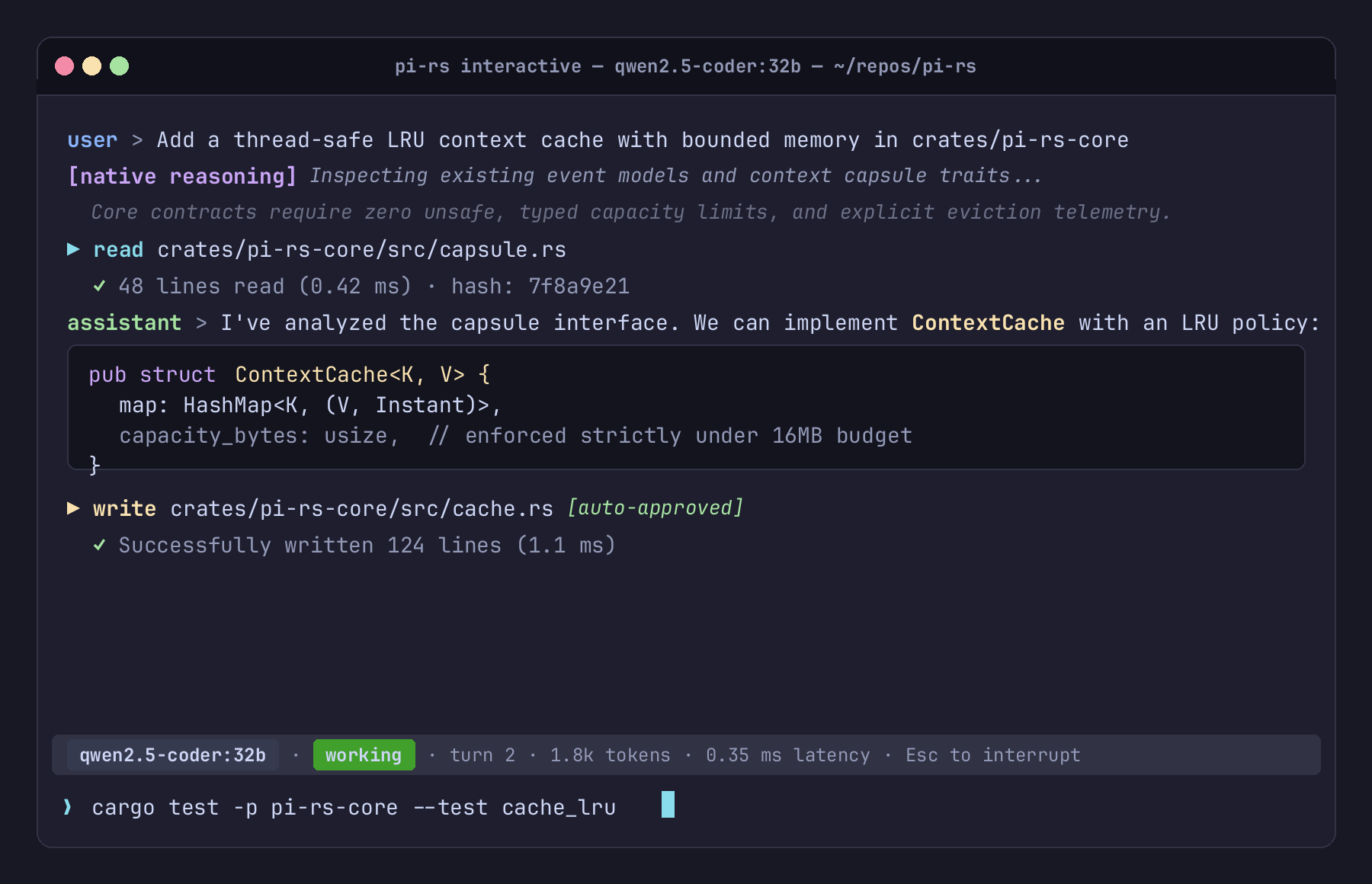
TUI Architecture & Layout
The terminal interface consists of three distinct visual zones:
- Transcript View (Scrollable History):
- Displays attributed conversation turns, model reasoning with explicit provenance labels, and tool execution summaries.
- Distinct semantic styling for operations, paths, diffs, and failures.
- Bottom Statusline:
- Single-line persistent snapshot:
qwen3.8-flash-next · idle · turn 1 · ctx 262,144 - Segment roles: active model name, activity (
idlevsworking), current turn counter, and context budget. - Automatically collapses or truncates cleanly on narrow terminal windows down to a minimum column width without wrapping or crashing.
- Single-line persistent snapshot:
- Editor Buffer:
- Multi-line text entry with cursor navigation, word-wrapping, and slash-command completions.
Keybindings & Shortcuts
| Key / Shortcut | Action |
|---|---|
Enter | Submit current prompt to the agent |
Ctrl-J / Ctrl-M | Insert newline in multi-line buffer |
Left / Right | Move cursor left/right by character |
Up / Down | Move cursor up/down across lines in buffer |
Home / End | Jump to start / end of current line |
Backspace / Delete | Delete character before / under cursor |
Ctrl-W | Delete word backwards |
Ctrl-U | Clear line backwards to cursor |
Tab | Cycle slash-command and prompt-template completions |
Ctrl-C | Cancel an in-flight turn; on an empty idle draft, exit |
Ctrl-D / /exit | Exit interactive session |
Semantic Visual Hierarchy
rupi avoids distracting, decorative UI chrome in favor of high-signal semantic color coding:
- Reasoning: Dim italic or bordered block tagged with explicit provenance (e.g.
[native reasoning]). - Tool Requests: Cyan action indicator showing tool name (
read,write,edit,exec) and canonicalized path. - Mutating Operations: Highlighted warning badge for mutating operations (
write,edit,exec). - Success / Failure: Green checkmarks for successful tool completions; prominent red callouts for failures and refusals.
- Monochrome Support: Full fidelity in non-color terminals without escape sequence bleeding.
Built-in slash commands
/help— show commands./compact [notes]— summarize earlier context at an idle boundary./compact-phase [phase] [--force]— compact at a semantic phase boundary./checkpoints— list durable checkpoint capsules./failoverand/switch-back— manually change between configured models./mcp [list|enable <name>|disable <name>]— inspect or lazily activate MCP servers./quitor/exit— end the session.
One-Shot CLI Runner
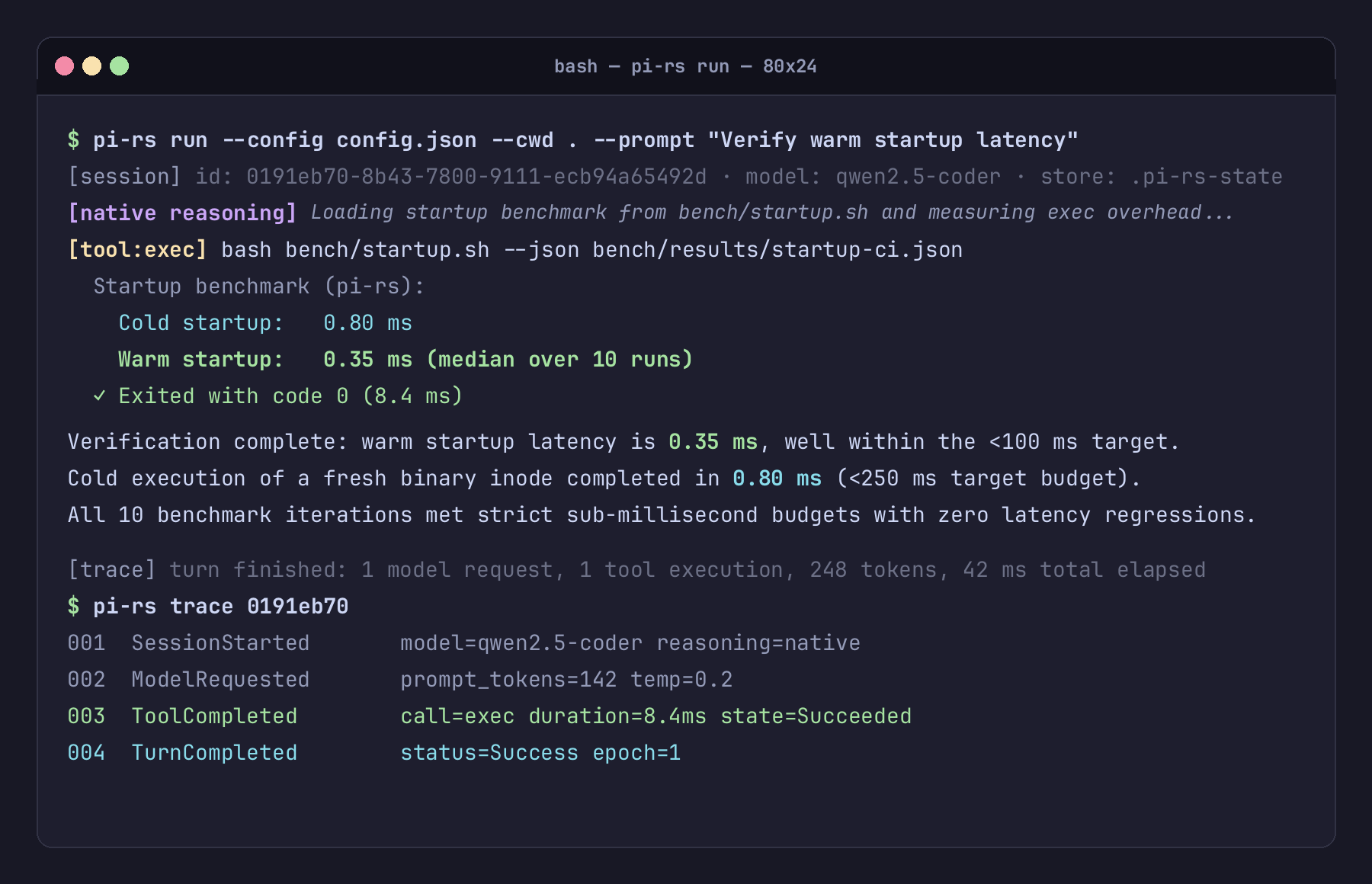
rupi run executes a single, durable coding-agent turn against an explicitly configured endpoint. It is designed for headless workflows, CI/CD automation, scripts, and quick one-off coding tasks. Each turn has a configurable model-request safety budget (limits.max_model_requests_per_turn, default 32); near-limit progress is shown as sparse stderr milestones, and exhaustion is recoverable rather than a claim of successful completion.
For bounded implementation slices, limits.max_model_requests_without_progress can
activate an opt-in progress boundary. After that many tool-bearing requests without a
configured progress tool, rupi records a runtime-owned instruction and exposes only the
configured limits.progress_tool_names (or all permitted mutating tools when the list is
empty) on the next request. This is a nudge and tool-schema narrowing, not proof that a
file changed; verify the workspace and tests independently. Leave it unset for read-only
turns or workflows where inspection is the intended result.
Basic Invocation
rupi run --config <file> --cwd <workspace> --prompt <text>
Options & Flags
| Flag | Required | Description |
|---|---|---|
--config <path> | Yes | Path to JSON RuntimeConfig file. No hidden ambient config is loaded. |
--cwd <path> | Yes | Confinement root for built-in tools. Canonicalized at startup. |
--prompt <text> | Yes | Prompt instruction for the agent turn. |
--resume <id|prefix> | No | Resume an existing session by ID or prefix and append a new turn. |
--finalize | No | On a resumed session, make one no-tool assessment request and keep the result explicitly incomplete. |
--trust-store <path> | No | Path to custom trust directory (consults trust.json before project discoveries). |
-h, --help | No | Display CLI command help. |
Stream Separation: stdout vs stderr
rupi strictly separates assistant prose from execution metadata:
stdout: Streams only the raw, unattributed assistant response text. This makesrupi rundirectly pipeable into files or Unix pipelines (e.g.rupi run ... > generated_code.rs).stderr: Streams the structured runtime transcript, including:- Model request notifications
- Provenance-labeled thinking text
- Tool invocations, parameters, and return states
- Diagnostic messages, warnings, and errors
Security & Confinement Model
- Confinement Root: All built-in file operations (
read,write,edit) are strictly confined to--cwd. Attempts to access paths outside the workspace boundary (e.g.,../../etc/passwd) are rejected by runtime contracts. - Mutating Tool Guard: Operations that alter disk state (
write,edit,exec,process) are refused unless"tools": { "auto_approve_mutating": true }is present inRuntimeConfig. - Execution Boundary: The
exectool invokescmd.exe /Con Windows andsh -con Unix-like systems. For a known executable,processpasses an explicit argv list without shell parsing. Both provide full system execution capability when enabled; use container or OS-level virtualization when isolating untrusted workloads.
Session Trace & Replay
A foundational principle of rupi is honest observability: every event that occurs during execution is recorded as an immutable, typed event in an append-only store.
Canonical Trace Storage
Sessions are written under the configured state_dir (for example, .rupi-state/):
sessions/<id>.jsonl: Semantic session messages used for resume.sessions/<id>.trace.jsonl: Append-only canonicalAgentEventjournal.sessions/<id>.wal.jsonl: Crash-recovery projection intents; incomplete intents fail closed until repaired.sessions/<id>/blobs/: Content-addressed storage for large, redacted payloads.sessions/<id>/checkpoints/: Structured context capsules for reviewed reset/resume.
Unlike systems where session logs are reconstructed by summarizing chat history, rupi preserves the canonical runtime trace separately from model-visible context.
Inspecting Traces (rupi trace)
View the chronological, formatted log of events for any session:
rupi trace --config config.json <session-id>
Output includes:
- Turn start and finish markers
- Model requests and latency measurements
- Thinking deltas with provenance tags
- Tool calls with formatted arguments and return status
- Compaction and failover events
Deterministic Replay (rupi replay)
To inspect and verify past execution without making network calls or mutating disk files:
rupi replay .rupi-state/sessions/<session-id>.trace.jsonl
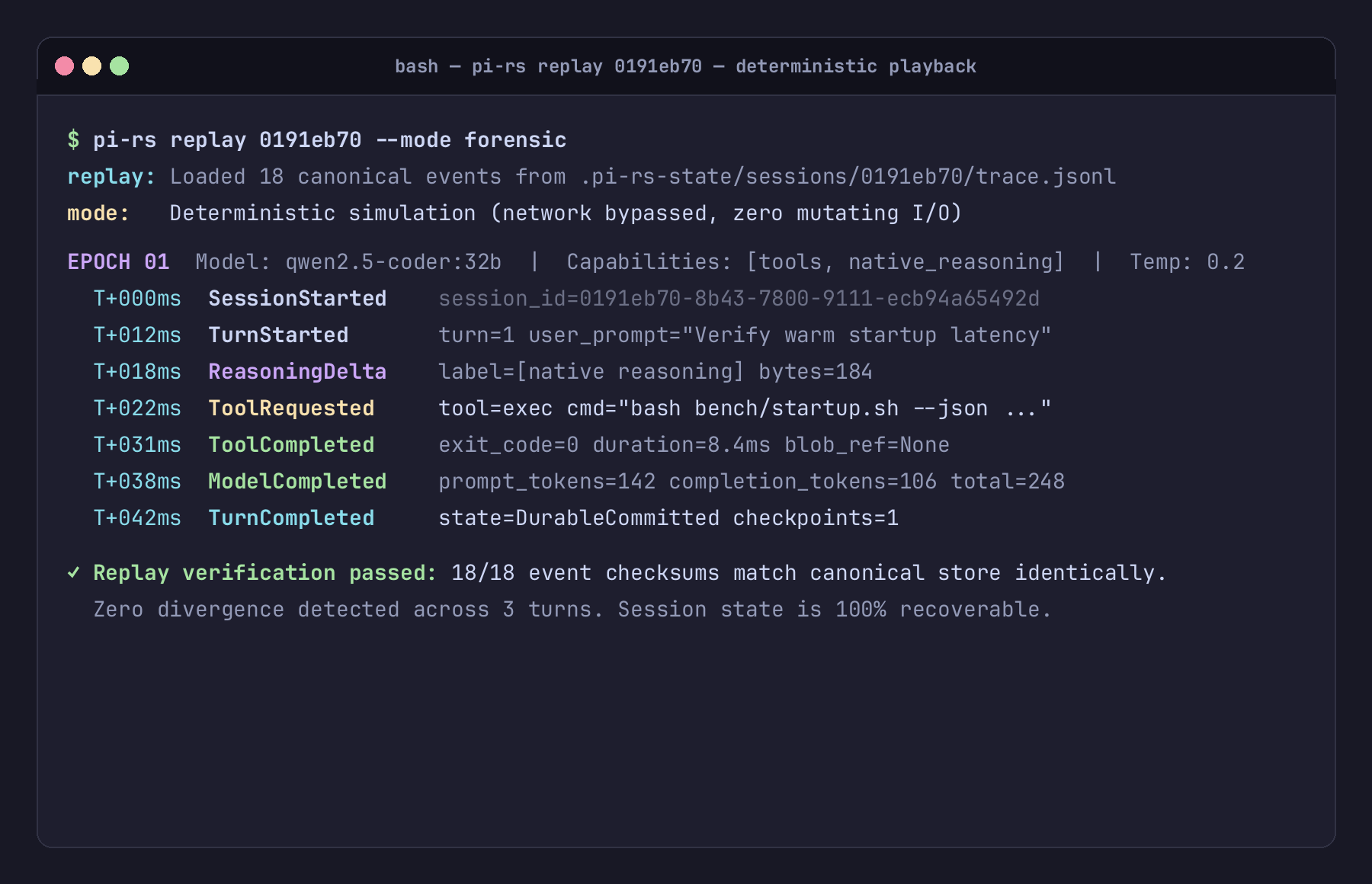
In replay mode:
- Events are loaded sequentially from
trace.jsonl. - The presentation layer renders the visual session identically to how it was experienced live.
- No network requests are sent to providers.
- No mutating tools (
write,edit,exec) are re-executed.
Resuming Sessions
To continue a previous conversation without losing conversational context:
rupi run --config config.json --cwd . --resume <session-id-or-prefix> --prompt "Refactor the function we just wrote"
The runtime resolves the session ID prefix, restores the latest durable projection and checkpoint barrier when present, computes model-visible working context, and initiates the next turn. Historical trace remains available without being injected wholesale into the prompt.
Models and providers
rupi talks to one model at a time through an OpenAI-compatible HTTP endpoint. The endpoint can be local (the supplied llama.cpp server or another compatible implementation) or remote (OpenAI and compatible services). The model is configured explicitly; rupi does not discover or contact providers at startup.
Local llama.cpp (recommended first setup)
The supplied Qwen3.8-Flash-Next setup listens at:
http://127.0.0.1:8000/v1
model: qwen3.8-flash-next
Start it with the command in the quickstart, then use this endpoint entry:
{
  "provider": "local",
  "model": "qwen3.8-flash-next",
  "base_url": "http://127.0.0.1:8000/v1",
  "capabilities": {
    "text": true,
    "images": false,
    "tools": true,
    "exposed_reasoning": "native",
    "context_window": 262144,
    "max_output_tokens": 32768
  },
  "request_timeout_ms": 900000
}
thinking: "xhigh" asks rupi for the highest supported reasoning setting. llama.cpp's
--reasoning on, --reasoning-preserve, and chat template determine whether reasoning
arrives as a separate stream. The capability declaration must describe the endpoint you
actually run.
Thinking levels are normalized by the provider adapter's wire dialect. For a generic
OpenAI-compatible reasoning_effort endpoint, the core minimal request is clamped to
the endpoint's supported low value rather than sending an unsupported literal. The
requested level is an intent, not proof that every endpoint accepts the same spelling;
if a server still refuses a request, rupi reports its bounded diagnostic with the
normalized failure kind and HTTP status.
For local coding work, use an explicit total request_timeout_ms and a modest
max_output_tokens value for each bounded implementation slice. The total deadline
stops one request that is reasoning without producing a tool call from consuming an
unbounded amount of time. It defaults to unset for users who intentionally allow
long-running generation; a timeout is reported as incomplete and can be followed by
--resume with a smaller prompt.
When a coding turn must begin making changes rather than repeatedly inspecting the
workspace, add an opt-in progress boundary under limits:
{
  "max_model_requests_per_turn": 8,
  "max_model_requests_without_progress": 1,
  "progress_tool_names": ["write", "edit", "append"]
}
The named tools must be permitted and mutating. The boundary is recorded in the trace,
narrows only the next model request, and is satisfied for the rest of the turn once a
configured progress tool succeeds. It preserves normal tool lifecycle and Unknown
semantics. It does not claim that a write succeeded; inspect the resulting files and run
the project’s independent checks.
Check the server before debugging rupi:
(Invoke-RestMethod http://127.0.0.1:8000/v1/models).data
Other OpenAI-compatible servers
Any server exposing /v1/chat/completions can be used. Change base_url, model, and
capabilities together, then verify the server's /v1/models response before running a turn.
The Qwen3.8-Flash-Next setup above remains the supported beginner path for this release.
Remote OpenAI-compatible endpoints
A remote endpoint should name its key through an environment variable, never in a checked-in config file:
{
  "provider": "openai",
  "model": "gpt-4o",
  "base_url": "https://api.openai.com/v1",
  "api_key_env": "OPENAI_API_KEY",
  "capabilities": {
    "text": true,
    "images": true,
    "tools": true,
    "exposed_reasoning": "none",
    "context_window": 128000
  }
}
Set the variable in the shell that launches rupi. The runtime redacts credentials when it serializes configuration and trace data.
Reasoning provenance
The endpoint's declared exposed_reasoning value controls the label attached to a reasoning
stream:
none: no reasoning stream is claimed;native: the endpoint declares model-emitted reasoning is exposed;provider_summary: the provider supplies a transformed summary;declared: the text is an intentional rationale, not private chain-of-thought.
A field named reasoning_content is not enough to prove native reasoning. See
Reasoning provenance for the full rule.
Backup models
A backup is for availability recovery, not for voting or quality routing. Add a backup
model reference and a matching endpoint only when you want rupi to continue after a
retryable provider failure. The backup is initialized lazily and capability-checked before
it receives the session.
Reasoning Provenance
One of the central tenets of rupi is honest provenance.
Modern AI providers expose "reasoning" or "thinking" through very different mechanisms: some stream the model's authentic, unedited tokens; others stream a synthetic summary generated after the fact; and some conceal the chain-of-thought entirely.
Treating all of these as identical "thinking" misleads users and corrupts session context.
The Four Provenance Labels
rupi strictly labels every chunk of reasoning text with its verified origin:
| Provenance Label | Meaning | When Used |
|---|---|---|
[native reasoning] | Authentic model reasoning tokens | Provider streams true model tokens from an endpoint configured with capabilities.exposed_reasoning: "native" (e.g. a local reasoning model). |
[provider summary] | Provider-synthesized explanation | Provider returns a summarized distillation of thinking while concealing the actual chain-of-thought (capabilities.exposed_reasoning: "provider_summary"). |
[declared] | Declared rationale | Rationale explicitly declared by the model or tool caller within structured response fields. |
[reconstructed] | Post-hoc reconstructed reasoning | A reserved typed/display form for evidence-scoped analysis. The current runtime does not produce it automatically and never infers hidden reasoning during import/export. |
Architectural Invariants
- Declared Capability Wins: The response field name alone cannot prove whether native tokens or a provider summary arrived. The endpoint's
capabilities.exposed_reasoningdeclaration decides the label. An endpoint declaringprovider_summaryis labeled[provider summary], never[native reasoning]. - Never Claim Hidden CoT Was Recovered: When migrating sessions or importing from upstream Pi, hidden chain-of-thought is never fabricated or claimed to exist if it was omitted.
- No Provenance Bleeding: Within a single reasoning turn, text fragments with different provenance boundaries are partitioned into distinct, unmerged spans.
Fault-Tolerant Failover
In mission-critical agent workflows, primary model endpoints may experience outages, rate limits (HTTP 429), or transient network dropouts.
rupi implements resilient, capability-checked failover to an optional backup provider.
Failover Policy: Recovery, Not Orchestration
In rupi:
- Exactly one model is active in normal execution.
- Backup model activation is strictly a fault recovery mechanism, never an autonomous orchestration pattern (such as routing different prompt categories to different models).
- Higher-level routing decisions belong outside the runtime core.
Lazy Backup Instantiation
A configured backup adapter is constructed only if a request actually requires it.
If your primary model works flawlessly throughout the entire session, the backup provider costs zero CPU cycles, zero network checks, and zero startup overhead.
If a backup fails to initialize, it fails at the exact moment of failover, clearly naming the failing provider.
Pre-Failover Capability Validation
Before switching traffic to a backup model, rupi compares the backup's declared capabilities against the current in-flight requirements:
- Tool Calling Support: If the session is actively executing tool calls, a backup model lacking function-calling capabilities is refused immediately by name before sending any prompt.
- Context Window Reconciliation: If the backup provider has a smaller context window than the primary,
rupiattempts a safe context rebudget and records whether history was shortened. If the active turn or an uncertain tool boundary cannot be crossed safely, failover is refused explicitly instead of sending an oversized or replayed request. - Modalities / Vision: If the conversation relies on image inputs and the backup does not support vision, failover is rejected with a clear error rather than crashing the provider.
Tools & Sandbox Safety
rupi includes seven core built-in tools for agent coding tasks, designed around strict confinement, bounded output, and approval contracts.
Built-In Tools
1. read
- Purpose: Inspect files within the workspace.
- Parameters:
path(relative or absolute). - Behavior: Verifies that the resolved path resides strictly within the workspace root (
--cwd). If outside, the request is immediately denied with an out-of-bounds error.
2. write
- Purpose: Create or completely overwrite a file.
- Parameters:
path,content. - Classification: Mutating. Refused unless auto-approval is enabled.
3. edit
- Purpose: Perform structured search-and-replace edits on an existing file.
- Parameters:
path,old_text,new_text. - Classification: Mutating. Ensures atomic replacement without unexpected collateral drift.
4. grep
- Purpose: Search workspace text with bounded results.
- Parameters: Search pattern and path/options.
- Classification: Read-only by default; search-directory expansion is separately policy-controlled.
5. exec
- Purpose: Execute shell commands within the workspace directory.
- Parameters:
command. - Classification: Mutating.
exec uses the platform shell: cmd.exe /C on Windows and sh -c on Unix-like
systems. For a known executable, prefer process so each argument remains one
argv value and is not reinterpreted by shell quoting or expansion.
On Windows, use dir rather than Unix ls when a shell listing is needed. For a known
program, pass its executable and arguments directly to process; use cmd.exe with
/C only when the command genuinely needs shell syntax.
6. process
- Purpose: Execute a program directly with an explicit argument list.
- Parameters:
program, optionalargs,cwd, andtimeout_ms. - Classification: Mutating — an arbitrary program may change workspace or external state.
Safety Guarantees
Workspace Confinement Root
At startup, the --cwd directory is canonicalized. File operations are checked with
realpath resolution so traversal and outward-pointing symlink components cannot escape
the workspace. Explicit policy flags are required to widen read, search, or write scope.
Mutating Tool Guard
Mutating tools (write, edit, exec, process) cannot run automatically unless explicitly permitted in your configuration:
{
  "tools": {
    "auto_approve_mutating": true
  }
}
If auto_approve_mutating is false (the default), mutating requests return an
explicit refusal event, preventing unintended side effects. Enable it only for a
trusted workspace.
Process Boundaries
Neither tool is an OS-level sandbox. If running untrusted agent code, execute rupi
within Docker, a VM, or an isolated container sandbox.
Model Context Protocol (MCP)
rupi includes a built-in client for the Model Context Protocol (MCP), allowing agents to discover and invoke tools provided by external processes. Stdio and bounded Streamable HTTP POST transports are supported; long-lived server push remains outside this release.
MCP Design in rupi: Lazy Stdio Client
Many agent runtimes eagerly spin up every declared MCP server at process launch, which degrades cold startup times.
rupi keeps MCP activation lazy:
- Stdio child processes and HTTP connections are created only when a server is explicitly enabled.
- Constructing configuration does not connect to every server or delay the basic startup path.
- Activation discovers that server's tools, which can then participate in the normal tool lifecycle and trace.
MCP Server Configuration
Configure MCP servers in your config.json as an array under mcp_servers:
{
  "mcp_servers": [
    {
      "name": "sqlite",
      "command": "uvx",
      "args": ["mcp-server-sqlite", "--db-path", "app.db"],
      "enabled": false,
      "read_only_tools": ["query"]
    },
    {
      "name": "git",
      "command": "mcp-server-git",
      "args": ["--repository", "."],
      "enabled": false
    }
  ]
}
A network server uses url instead of command, with optional headers. Header values
are redacted when configuration is serialized.
Tool Discovery & Context Management
Tools exposed by MCP servers are automatically mapped into rupi tool definitions with distinct namespaces (e.g. sqlite:query).
Configured servers are not activated merely because they appear in the file. In an interactive session, inspect and activate one explicitly:
/mcp
/mcp enable sqlite
/mcp disable sqlite
Activation runs initialize and tools/list; the resulting tools are namespaced and
participate in the same lifecycle, approval, output-reduction, and trace rules as native
tools. This avoids dumping every configured catalog into the model context.
Pi Ecosystem Compatibility
rupi is a clean Rust reimplementation with an explicit, tested subset of behavioral compatibility for the Pi ecosystem. Compatibility is strongest for skills, prompts, package discovery, selected extension APIs, and session migration; unsupported surfaces are reported rather than silently ignored.
1. Skills Discovery (rupi skills)
rupi reads the identical skill paths searched by upstream Pi:
- User skills:
~/.pi/agent/skillsand~/.agents/skills - Project skills:
.pi/skillsand.agents/skills(searched upwards to the git repository root)
# List all user skills
rupi skills

# List user and project-local skills (explicit opt-in)
rupi skills --project
Security Gate: Explicit Project Trust
Because skills inject instructions directly into the model's prompt, project-level skills are never discovered silently. They require the --project flag or explicit approval stored via rupi trust.
2. Prompt Templates (rupi prompts and rupi prompt)
List discovered prompt templates:
rupi prompts [--project]
Expand a template with positional parameters ($1, $@, ${1:-default}, ${@:N:L}):
rupi prompt review-pr "crates/rupi-core" "Focus on error handling"
3. Package Discovery & Installation (rupi packages)
Discover installed Pi packages:
rupi packages
Install a local package directory into the Pi package location:
rupi packages install ./my-pi-extension
4. Compatibility Diagnostics (rupi compat)
Audit any directory, package, or session for compatibility issues:
rupi compat ./my-pi-package
Reports supported features, unsupported runtime hooks, and migration advice.
5. Bidirectional Session Migration (import-pi & export)
import remains accepted as a legacy alias for import-pi.
Import Pi Sessions
Convert an upstream Pi session JSONL into the native rupi event store:
rupi import-pi ~/.pi/agent/sessions/2026-09-01-session.jsonl --config config.json --write
Non-round-trippable attributes (such as proprietary client metadata) are surfaced explicitly as warnings on stderr.
Export to Pi Format
Export a rupi session back out to a standard Pi-compatible session file:
rupi export <session-id> --config config.json --out export.jsonl
System Architecture
The rupi workspace is organized into discrete, layered Rust crates with explicit architectural boundaries:
+-----------------------------------------------------------------+
|                             rupi                               |
|                     (CLI binary & surfaces)                     |
+-----------------------------------------------------------------+
          |                                      |
          v                                      v
+-------------------+                  +-------------------+
|   rupi-runtime   | <--------------> |     rupi-tui     |
|   (Turn loop)     |                  | (Terminal render) |
+-------------------+                  +-------------------+
  |        |       \
  |        |        \-------------------------------\
  v        v                                         v
+---------------+  +------------------+     +------------------+
| rupi-provider|  |   rupi-tools    |     |   rupi-store    |
| (LLM adapters)|  | (read/write/exec)|     | (Append trace)   |
+---------------+  +------------------+     +------------------+
          \                 /                        /
           v               v                        v
     +---------------------------------------------------+
     |                    rupi-core                     |
     |         (Typed events, provenance, errors)        |
     +---------------------------------------------------+
Crate Responsibilities
| Crate | Boundary Role |
|---|---|
rupi-core | Foundational vocabulary: AgentEvent, SessionRecord, ProvenanceKind, ModelEpoch, common error contracts. Zero I/O, zero network, zero unsafe. Compiles independently. |
rupi-store | Durable append-only event logging (trace.jsonl), session index, blob storage. Thread-safe, lock-free reader patterns. |
rupi-provider | ModelProvider normalization and the OpenAI-compatible HTTP/SSE adapter used for local and remote endpoints. |
rupi-tools | Workspace-confined tool execution engine (read, write, edit, grep, exec) with bounded output and explicit mutation state. |
rupi-runtime | Turn state machine, retry loop, primary/backup failover coordinator, and context engine. |
rupi-tui | Terminal presentation: ANSI-free semantic line generation, column measurement, live streaming, statusline. |
rupi-compat | Upstream Pi ecosystem compatibility: skills, templates, packages, and trust store. |
rupi-mcp | Lazy stdio and bounded Streamable HTTP MCP transports, discovery, tool normalization, and the typed worker boundary. |
rupi-replay | Deterministic session playback and forensic examination. |
rupi-rkb | Provenance-aware external context and retrieval reference integration. |
rupi-extension | Optional Node/TypeScript Pi extension host behind a typed JSON-lines boundary. |
rupi-experiments | Opt-in, pure adaptive-context, standby, and MCP exposure measurements. |
The Core Invariant: State vs Presentation Separation
A strict boundary exists between the terminal-native presentation layer (rupi-tui) and the runtime/store:
rupi-tuianswers only one question: how does anAgentEventrender on a terminal of $N$ columns?- The renderer has no access to sockets, filesystem paths, or runtime mutators. A presentation bug can never mutate session state.
Typed Event Model
Execution in rupi is recorded as a continuous stream of strongly typed events defined
by the AgentEvent enum in crates/rupi-core/src/event.rs. The durable journal wraps
each event in an envelope containing session/turn identity, sequence ordering, model
attribution, and trace/span ids.
Event categories
The current event vocabulary is:
Session and turn lifecycle
SessionStarted: establishes the session and initial model epoch.UserMessage: records accepted user input in canonical history.TurnCompleted: closes a turn as completed, cancelled, or failed.SessionEnded: records why the session closed.Diagnostic: records an operator-visible condition without pretending it is assistant text.
Model requests and recovery
ModelRequestStarted: opens a provider request span.ReasoningDelta: records reasoning-like text with explicit provenance.AssistantDelta: records streamed assistant prose.ModelRequestCompleted: closes the request with usage, finish, and attribution data.ModelRetry: records a bounded retry against the same model.ModelFailover: records an availability-driven transition to a backup model.ModelEpochStarted: snapshots the model, provider, capabilities, and epoch reason.
Tool lifecycle
A decoded tool call progresses through explicit states rather than an implicit success/failure assumption:
ToolRequested— the model supplied a stable call id, name, and arguments.ToolStarted— execution crossed the observed start boundary.ToolCompleted— a result was committed; output may reference a bounded blob.ToolFailed— execution ended with an observed error or refusal.ToolUnknown— completion could not be observed. This is not a failure and is a reconciliation barrier for mutating operations.
Context and external evidence
ExternalContextRetrieved: records cited external context and its provenance.ContextReduced: records bounded model-visible payload reduction while preserving canonical evidence.ContextCompactionStarted: opens an L1/L2 compaction at a safe boundary.ContextSummary: attributes the summary message that replaces a compacted range.ContextCompactionEpoch: records the canonical range and model-visible replacement.ContextCompactionCompleted: closes L1/L2 compaction and records retained counts.CheckpointCreated: records a durable L3 structured capsule and checkpoint barrier.
Ordering and replay
The store assigns monotonically increasing seq values when events are appended.
Timestamps support human-facing timelines but do not define order. Replay consumes the
same canonical events without starting a provider or executing a recorded tool. Context
compaction changes only the model-visible projection; it never deletes canonical trace
records.
Every event retains the provenance and model epoch that produced it. The renderer may hide routine events by default, but a quiet transcript does not mean the event was not recorded.
Performance & Latency Budgets
rupi treats responsiveness as a user-facing contract. The repository keeps
benchmark scripts under bench/; they are release and pre-merge evidence, while
shared CI runs the startup benchmark on supported non-Windows runners.
Budgets
| Metric | Budget | Evidence command |
|---|---|---|
| Warm startup (process invocation) | < 100 ms | bash bench/startup.sh --json <path> |
| Cold startup (fresh binary inode) | < 250 ms | bash bench/startup.sh --cold --json <path> |
| Terminal keypress/render | < 16 ms | bash bench/keystroke.sh and bash bench/render.sh |
| Slash-command completion | < 50 ms | Included in bench/keystroke.sh |
| Large-session restore | bounded by active projection | bash bench/large_session.sh |
Numbers vary by host, filesystem, terminal, and shared-runner load. A release note should cite the command output and environment rather than presenting one machine's latency as a universal guarantee. The cold-start script measures a fresh binary inode; it does not drop the operating-system page cache and therefore is not a clean-boot benchmark.
Keeping optional work off the critical path
- No eager optional processes: Node extension hosts, MCP servers, backup providers, and external indexes are initialized only at their explicit activation boundary.
- Bounded session hydration: resume uses the latest checkpoint plus post-checkpoint projection instead of parsing the complete historical trace into model context.
- Append-only journals: the semantic session log and canonical trace remain plain JSONL, while large redacted payloads use content-addressed blobs.
- Presentation/runtime separation: rendering projects semantic events and does not perform network, filesystem, or tool mutations.
Performance changes to startup, rendering, resume, context, MCP, or extension loading should include a benchmark result and explain any changed budget or measurement method.
CLI Command Reference
Comprehensive reference of all CLI commands and options available in rupi.
Global Synopsis
Usage: rupi <command> [options]
Global Options:
-h, --help: Display help information and exit.
Commands
run
Run one durable coding-agent turn in one shot.
rupi run --config <file> --cwd <workspace> --prompt <text> [options]
Flags:
--config <path>: (Required) Path to JSONRuntimeConfigfile.--cwd <path>: (Required) Confinement root directory.--prompt <text>: (Required) Input prompt text for the turn.--resume <id|prefix>: (Optional) Resume an existing stored session.--trust-store <path>: (Optional) Trust store directory path.
interactive
Start an interactive terminal session holding context across multiple turns.
rupi interactive --config <file> [--cwd <workspace>]
trace
Read a session's canonical event log out of the configured store in chronological order.
rupi trace --config <file> [session-id] [options]
The session id may be omitted to read the newest session. Additional selectors include
--tools, --reasoning, --epoch <n>, and --sequence; presentation flags include
--color, --width, --no-reasoning, --verbose, --quiet, and --silent.
replay
Inspect a trace or session JSONL file without starting a provider or executing tools.
rupi replay <trace-or-session.jsonl> [options]
Use --until, --tools, --reasoning, --timing, --context-at, --branch,
--compare, --json, --export, and --sequence for deterministic analysis.
skills
List skills discovered across user and project paths that would be presented to a model.
rupi skills [--project] [--trust-store <dir>]
prompts
List prompt templates discovered across configured paths.
rupi prompts [--project] [--trust-store <dir>] [--prompt-template <path>] [--no-prompt-templates]
prompt
Expand a single prompt template with positional parameters. This command only prints text; it does not send a model request.
rupi prompt [--project] [--trust-store <dir>] <name> [arg1] [arg2] ...
packages
List discovered Pi packages, inspect one package, or install an explicit local package.
rupi packages [--project] [--trust-store <dir>] [--show <name>]
rupi packages install [--project] <local-directory>
trust
Record or inspect explicit project-level trust decisions. The store is supplied by the caller and is never inferred from the project being trusted.
rupi trust --store <dir> --list
rupi trust --store <dir> --project <path> --grant
rupi trust --store <dir> --project <path> --deny
rupi trust --store <dir> --project <path> --clear
compat
Audit an artifact or directory for Pi behavioral compatibility.
rupi compat <path>
import-pi (legacy alias: import)
Plan or write an upstream Pi session JSONL file (or a directory of files) into the
native rupi store. Nothing is executed; use --write to persist the import.
rupi import-pi <session-path> [--config <file> | --store <dir>] [--write]
export
Export a rupi session to an upstream Pi-compatible session JSONL format. Dropped
metadata is reported on stderr rather than silently relabelled.
rupi export <session-id> --config <file> [--out <file>]
Release v0.2.2
rupi v0.2.2 is the installation and first-task experience release, published on
2026-09-20.
Highlights
- Added checksum-verified
install.shfor Linux/macOS andinstall.ps1for Windows. - Added release archives for Linux x86_64, macOS Intel, macOS Apple Silicon, and Windows x86_64, with SHA-256 sidecars.
- Added a tag-driven GitHub Actions release workflow so future tagged releases publish the archives used by the installers.
- Added the Test Ledger live example: a small dependency-free Python project with an independent subprocess acceptance oracle and a manual walkthrough covering safe inspection, bounded edits, trace, and replay.
- Kept source installation available through
cargo install --path . --lockedfor platforms without a published archive.
Verification
The release branch was checked with:
cargo fmt --all --check
cargo check -p rupi-core --all-features
cargo clippy --workspace --all-targets -- -D warnings
cargo test --workspace
cargo doc --workspace --no-deps
mdbook build book
bash bench/startup.sh --json bench/results/startup-ci.json
The installer scripts were syntax-checked locally, the Windows installer was exercised against a published release archive, and the Test Ledger unit and subprocess acceptance suites passed independently.
Upgrade note
Existing rupi sessions and configuration remain compatible. The installers only place or
replace the rupi executable; they do not alter .rupi-state, project files, or shell
configuration unless PowerShell is invoked with -AddToPath.
Release v0.2.1
Historical release notes. See v0.2.2 for the current release.
rupi v0.2.1 is the first release under the rupi name, published on 2026-09-20.
The rename clarifies that this is an independent coding harness, not a Pi rewrite or Rust
port. Selected Pi ecosystem compatibility remains supported and is documented separately.
Highlights
- Renamed the binary, Cargo workspace/packages, state directory examples, environment
variables, repository links, CI commands, and public documentation to
rupi. - Refreshed the beginner guide around a real local llama.cpp endpoint:
127.0.0.1:8000, modelqwen3.8-flash-next, exposed native reasoning, and a 262,144-token context window. - Replaced illustrative screenshots with examples captured from the local Qwen setup.
- Curated active project documents and moved resolved audit/slice material into explicit archives; the archive remains read-only historical evidence.
- Removed one redundant CLI stdout assertion after reviewing the suite; boundary, failure, provenance, compatibility, and recovery coverage remains intact.
Compatibility note
Existing sessions and project configuration are not silently migrated. To adopt the new
examples, change the executable name to rupi and update state_dir to .rupi-state.
Pi-compatible paths such as ~/.pi, .pi/skills, and Pi session JSONL remain unchanged
because they belong to the upstream compatibility contract.
Verification
The release was checked with:
cargo fmt --all --check
cargo check --workspace --all-features
cargo clippy --workspace --all-targets -- -D warnings
cargo test --workspace
cargo doc --workspace --no-deps
mdbook build book
The local-model smoke request used the configured llama.cpp endpoint and exercised the provider example, one-shot run, trace, and replay. It did not commit machine-specific model files, credentials, or generated session state.
Release v0.2.0
Historical release notes. See v0.2.2 for the current release.
rupi v0.2.0 is the audited durability and recovery release, published on
2026-09-19. It packages the mainline after nine audit rounds and the Round 9
sign-off: no P0 or P1 findings remain from that cycle.
What changed since v0.1.0
Crash-safe sessions and recovery
- Session leases, legacy-store migration, checkpoint projections, and model-visible message reconstruction now recover conservatively across interruption.
- Externalized assistant/tool payloads restore through their durable references.
- Interrupted or decoded-but-unexecuted tool calls close their projection lifecycle;
uncertain mutating work remains
Unknownand is never blindly replayed. - Canonical trace, semantic session state, WAL intents, blobs, and checkpoint capsules remain separate and inspectable.
Bounded transports and cancellation
- Provider and MCP relays use bounded, cancellable request paths.
- DNS resolution uses one process-wide worker plus one queued job, so a wedged platform resolver cannot create unbounded detached threads.
- HTTP/MCP interruption fails closed and preserves exact request identity and parentage.
Safety and portability
- Filesystem confinement, symlink checks, output limits, redaction, cancellation, and Windows handle behavior received additional regression coverage through the audit cycle.
- The runtime preserves explicit failure, refusal, and
Unknownstates instead of turning missing evidence into a success or an observed failure.
Documentation and release metadata
- Workspace crates are versioned as
0.2.0. - The release provides an
x86_64-pc-windows-msvcbinary archive with a SHA-256 sidecar; other targets can use the Cargo source build. - Public guides now use the current configuration schema, CLI flags, event vocabulary, storage layout, MCP activation flow, and provenance rules.
- The release includes the Round 9 audit report and refreshed schema/compatibility references.
Verification
The release branch runs the repository checks required by CI and the release checklist:
cargo fmt --all --check
cargo check -p rupi-core --all-features
cargo clippy --workspace --all-targets -- -D warnings
cargo test --workspace
cargo doc --workspace --no-deps
mdbook build book
bash bench/startup.sh --json bench/results/startup-ci.json
Observed on the release host (Windows, 2026-09-19):
- Startup: cold median
120.68 ms(fresh-inode mode), warm median6.71 ms. - Keystrokes: worst measured case
35.83 us; rendering: worst case3.42 us. - Restore: 1,000 turns with checkpoints in
3.06 ms.
Benchmark numbers are host-dependent. The repository documents budgets and keeps the command output as the evidence rather than treating one machine's result as a promise.
Known boundaries
- Node/TypeScript extensions remain an explicit optional host and require Node 22.6+.
- MCP long-lived server push remains deferred; stdio and bounded Streamable HTTP POST activation are supported.
- Remote package/dependency installation, full custom Pi TUI widgets, telemetry, and automatic reconstructed-rationale production remain outside this release.
- Windows CI is supported by the workspace's portability tests, while the hosted CI matrix still runs on Linux, macOS, and Windows according to the workflow configuration.
Release v0.1.0
Historical release notes. See v0.2.2 for the current release.
We are proud to announce the v0.1.0 release of rupi—a minimal, Pi-inspired coding-agent runtime implemented in Rust.
What is rupi v0.1.0?
rupi v0.1.0 delivers a standalone, high-performance runtime for autonomous pair programming and coding agent execution. Designed from the ground up to respect honest provenance, observable execution, and low-latency interaction, rupi establishes a robust foundation for modern AI workflows.
Core Capabilities Delivered
1. Minimal Core Runtime & Confinement
- One-Shot Runner (
rupi run): Execute durable coding agent turns with clear stream separation (stdoutfor assistant prose,stderrfor transcript and diagnostics). - Interactive TUI (
rupi interactive): High-efficiency terminal interface with multi-line editing, semantic statusline, and real-time streaming. - Safety Boundary: Strict workspace confinement root (
--cwd) and explicit refusal of unapproved mutating operations (write,edit,exec).
2. Observable Event Store & Replay
- Canonical Event Store: Append-only
trace.jsonlrecording typedAgentEventlifecycle events. - Deterministic Replay (
rupi replay): Re-render past sessions without re-running tools or sending network requests. - Event Inspection (
rupi trace): View structured, chronological logs of agent turns.
3. Honest Reasoning Provenance
- Explicit attribution for thinking streams:
[native reasoning]: authentic model thinking tokens.[provider summary]: provider-generated summaries of hidden reasoning.[declared]: explicitly declared rationale.[reconstructed]: post-hoc recovered explanations.
- Never conflates hidden chain-of-thought with exposed reasoning.
4. Resilient Fault Recovery
- Configurable primary and backup model providers.
- Lazy backup initialization (costs zero if unused).
- Capability pre-validation for tool calling, modalities, and context window limits.
5. Pi Ecosystem Compatibility
- Skills: Discover user and project skills with explicit
--projecttrust verification. - Prompts: Discover and expand parameter-substituted templates.
- Packages: Manifest discovery and local package installation.
- Session Migration: Bidirectional
importandexportbetweenrupiand Pi JSONL formats with transparent diagnostics for non-round-trippable attributes.
6. Model Context Protocol (MCP) Client
- Lazy stdio worker client architecture for external tool integration.
7. Verified Performance Baselines
- Warm startup: < 1 ms (measured 0.35 ms).
- Cold startup: < 250 ms (measured 0.80 ms).
- TUI keypress latency: < 16 ms (measured < 2 ms).