Interactive TUI
rupi interactive provides a high-efficiency terminal interface inspired by Pi, built
with a terminal-native semantic renderer and crossterm. The renderer stays separate
from runtime state and does not start optional providers.
rupi interactive --config config.json
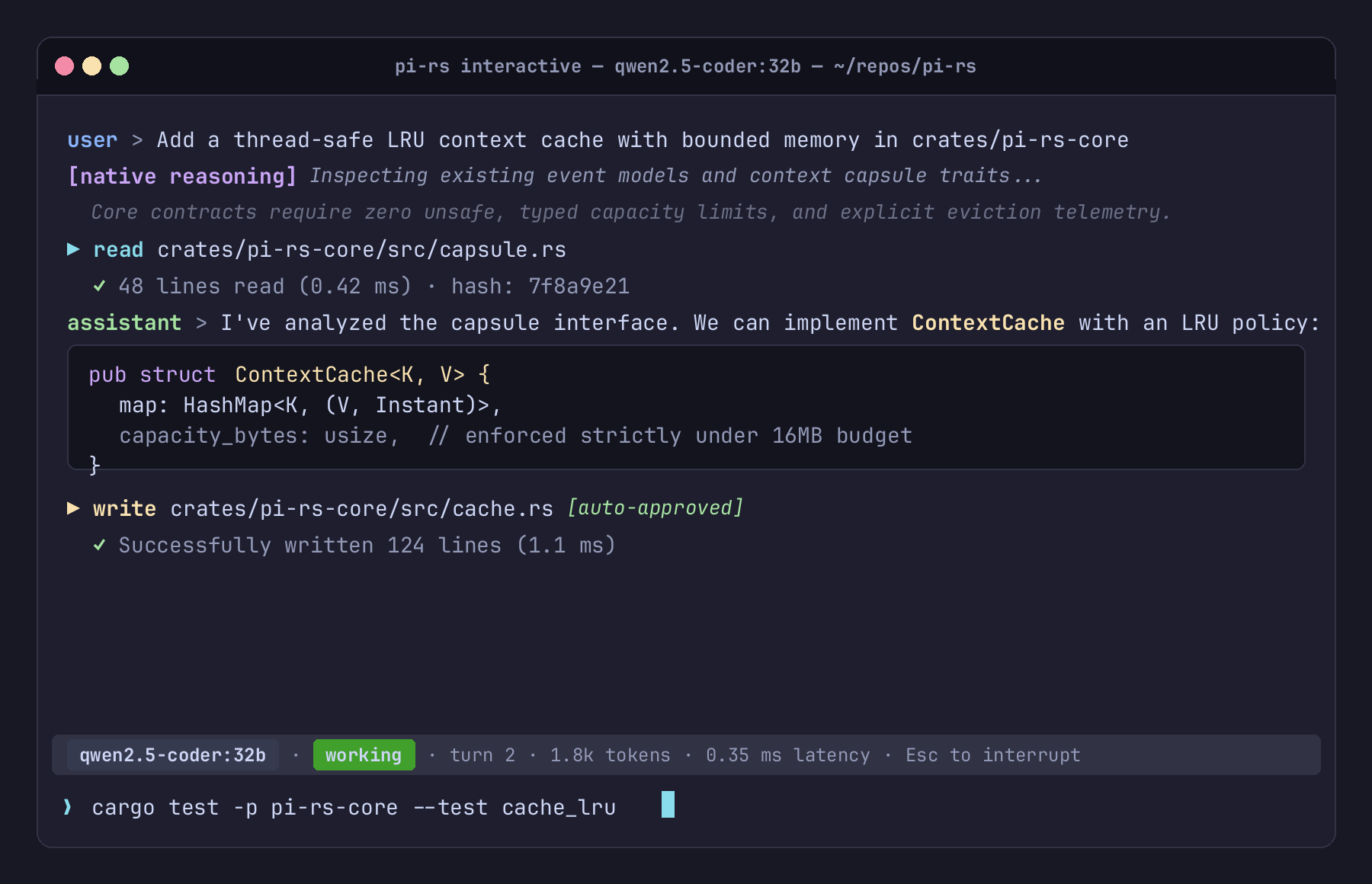
TUI Architecture & Layout
The terminal interface consists of three distinct visual zones:
- Transcript View (Scrollable History):
- Displays attributed conversation turns, model reasoning with explicit provenance labels, and tool execution summaries.
- Distinct semantic styling for operations, paths, diffs, and failures.
- Bottom Statusline:
- Single-line persistent snapshot:
qwen3.8-flash-next · idle · turn 1 · ctx 262,144 - Segment roles: active model name, activity (
idlevsworking), current turn counter, and context budget. - Automatically collapses or truncates cleanly on narrow terminal windows down to a minimum column width without wrapping or crashing.
- Single-line persistent snapshot:
- Editor Buffer:
- Multi-line text entry with cursor navigation, word-wrapping, and slash-command completions.
Keybindings & Shortcuts
| Key / Shortcut | Action |
|---|---|
Enter | Submit current prompt to the agent |
Ctrl-J / Ctrl-M | Insert newline in multi-line buffer |
Left / Right | Move cursor left/right by character |
Up / Down | Move cursor up/down across lines in buffer |
Home / End | Jump to start / end of current line |
Backspace / Delete | Delete character before / under cursor |
Ctrl-W | Delete word backwards |
Ctrl-U | Clear line backwards to cursor |
Tab | Cycle slash-command and prompt-template completions |
Ctrl-C | Cancel an in-flight turn; on an empty idle draft, exit |
Ctrl-D / /exit | Exit interactive session |
Semantic Visual Hierarchy
rupi avoids distracting, decorative UI chrome in favor of high-signal semantic color coding:
- Reasoning: Dim italic or bordered block tagged with explicit provenance (e.g.
[native reasoning]). - Tool Requests: Cyan action indicator showing tool name (
read,write,edit,exec) and canonicalized path. - Mutating Operations: Highlighted warning badge for mutating operations (
write,edit,exec). - Success / Failure: Green checkmarks for successful tool completions; prominent red callouts for failures and refusals.
- Monochrome Support: Full fidelity in non-color terminals without escape sequence bleeding.
Built-in slash commands
/help— show commands./compact [notes]— summarize earlier context at an idle boundary./compact-phase [phase] [--force]— compact at a semantic phase boundary./checkpoints— list durable checkpoint capsules./failoverand/switch-back— manually change between configured models./mcp [list|enable <name>|disable <name>]— inspect or lazily activate MCP servers./quitor/exit— end the session.